Contributor Access Settings
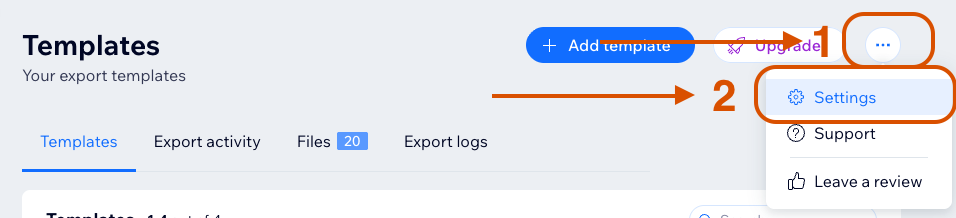
The site owner controls contributor access from Settings → Contributors access.
Contributor settings are additive restrictions. A contributor can use an action only when:
- Allow contributors to use app is enabled.
- The specific permission for that action is enabled when one exists.
- The action is available on the current plan.
- The template or file is not blocked by sensitive-field rules, catalog version mismatch, or Wix data access checks.
These settings do not affect the site owner. The owner can always use all FlexiExport actions.
Contributor permissions control what contributors can do in FlexiExport. They do not reduce owner access.
Global Access
Allow contributors to use app controls whether contributors can access FlexiExport.
When enabled, contributors can open the app and view available dashboard areas.
When disabled, contributors cannot use the app and see an owner-only access screen.
This setting must be enabled before any other contributor permission matters.
All Contributors and Specific Contributors
By default, the All contributors option controls the access rules for every contributor.
To configure access for one contributor:
- Ask that contributor to open FlexiExport once.
- Return to Settings → Contributors access.
- Select the contributor's User ID in the dropdown.
- Change the permissions for that contributor and click Save.
User-specific settings fully override All contributors settings for that user. Use Reset to remove the override and make the contributor use the global settings again.
If the User ID is not visible yet, ask the contributor to open FlexiExport once. Then refresh Settings and check the dropdown again.
If you are not sure which User ID belongs to the contributor, ask the contributor to open the app and check the User ID field under Need help? or Support.
Permissions Reference
| Setting | When enabled | When disabled |
|---|---|---|
| Allow contributors to use app | Contributors can open FlexiExport and use actions allowed by the other contributor settings. | Contributors cannot use the app. Other contributor settings are ignored. |
| Allow creating templates | Contributors can use Add template → Custom and Add template → Predefined, if the template limit is not reached. | Add template is disabled for contributors. |
| Allow modifying templates | Contributors can open templates for editing, save template changes, and duplicate templates. | Contributors cannot edit or duplicate templates. Existing templates are read-only for them. |
| Allow deleting templates and files | Contributors can delete templates. Deleting a template also deletes its associated export files and logs. | Contributors cannot delete templates. |
| Allow downloading files | Contributors can create short-lived download links for export files when download safety checks pass. | The Download action is unavailable for contributors. |
| Allow enabling scheduler | Contributors can enable or disable scheduler and configure scheduler settings for templates they can modify. | Scheduler controls are disabled for contributors. They cannot turn scheduler on or off. |
| Allow editing email recipients | Contributors can add or remove notification email addresses when email notifications are enabled and available on the plan. | Contributors cannot change notification recipients. Existing recipients remain unchanged. |
| Allow export file links in emails | Contributors can enable export file download links in notification emails when email notifications and link delivery are available. | Contributors cannot include generated FlexiExport file links in notification emails. |
| Allow FTP storage | Contributors can enable FTP delivery for templates they can modify, if FTP is available on the plan and FTP is configured. | Contributors cannot enable FTP delivery for templates. Existing FTP delivery may be unavailable to them in the template editor. |
| Allow Google Drive | Contributors can enable Google Drive delivery for templates they can modify, if Google Drive is available on the plan and connected. | Contributors cannot enable Google Drive delivery for templates. |
| Allow Google Sheets | Contributors can enable Google Sheets delivery for templates they can modify, if Google Sheets is available on the plan and Google Drive is connected. | Contributors cannot enable Google Sheets delivery for templates. |
| Allow configure FTP storage | Contributors can configure or disconnect the app-level FTP/SFTP connection from Settings. | FTP/SFTP configuration actions are disabled. Contributors can use FTP only if Allow FTP storage is enabled and the owner has already configured FTP. |
| Allow configure Google Drive storage | Contributors can connect or disconnect the app-level Google Drive integration from Settings. This also affects Google Sheets because Google Sheets uses the Google Drive connection. | Google Drive connection actions are disabled. Contributors can use Google Drive or Google Sheets only if the owner has already connected Google Drive and allowed the corresponding storage permission. |
Templates
The Templates settings control template management:
- Allow creating templates controls adding custom or predefined templates.
- Allow modifying templates controls editing existing templates and duplicating templates.
- Allow deleting templates and files controls deleting templates and their associated files and logs.
- Allow downloading files controls downloading generated files from the Files tab.
Template settings do not control whether a contributor can run an existing template. If contributors can use the app, they can start file generation for templates that are not blocked by plan limits or catalog version mismatch.
Generating a file is not the same as downloading it. Contributors may be able to generate a file but still be blocked from downloading it.
Scheduler
Allow enabling scheduler controls whether contributors can use scheduler controls.
If enabled, contributors can configure scheduler only within the normal template editing flow. They may still need Allow modifying templates to save scheduler changes in a template.
If disabled, scheduler controls are disabled and the UI shows that scheduler is disabled for contributors.
Email
The Email settings are split into recipient editing and export file link access.
- Allow editing email recipients controls whether contributors can add or remove notification email addresses.
- Allow export file links in emails controls whether contributors can include generated FlexiExport file download links in notification emails.
Export file links in emails can be used by anyone who has access to the email or copied link while the link is valid.
Google Drive and Google Sheets email links are controlled by whether those storage destinations are enabled for the template.
Email notification availability still depends on the current plan and recipient limit.
Storages
The Storages settings are split into using a destination in templates and configuring app-level connections.
Template Storage Usage
These settings control whether contributors can enable destinations in templates:
- Allow FTP storage
- Allow Google Drive
- Allow Google Sheets
If disabled, the destination toggle is unavailable to contributors.
App-Level Storage Configuration
These settings control whether contributors can configure connections in Settings:
- Allow configure FTP storage
- Allow configure Google Drive storage
Google Sheets does not have a separate app-level connection. It uses the Google Drive integration.
Running Exports
There is no separate contributor setting for Generate file.
If contributors can use the app, they can start export generation for templates that are not blocked. However, generating a file and downloading a file are different actions.
A contributor may be able to generate a file but still be unable to download it. Download is controlled by the contributor download permission, sensitive-field rules, and runtime Wix data access checks.
Download Access
Allow downloading files controls whether contributors can use the Download action in the Files tab.
Contributor downloads are allowed only when:
- Allow downloading files is enabled for that contributor.
- The file does not contain sensitive fields.
- The contributor has Wix access to all data used by the template.
This setting does not grant access to every generated file. Sensitive-field restrictions and Wix data access checks cannot be overridden by contributor settings.
Security Warning
Enabling storage, email, scheduler, or configuration access can expose exported data to destinations controlled by contributors. Review permissions carefully when templates include sensitive or private data.
Be careful with permissions that let contributors configure destinations or recipients. Those settings can route future export results outside owner-controlled locations.