Support
Use the Support action in FlexiExport to get help.
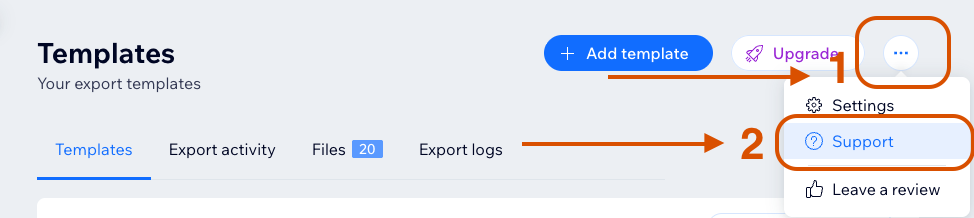
tip
Before contacting support, collect the template name, file ID, run ID, and a screenshot when available.
The support dialog can include useful app context such as:
- App instance ID.
- User ID.
- Whether the current user is the site owner.
Include this information when contacting support so the issue can be investigated faster.
Contact Methods
Support can be handled through the available support email or contact form, depending on where the app is installed and which support option is shown.
What to Include
When possible, include:
info
The more context you include, the faster support can identify the affected app instance, template, and export run.
- Template name.
- File ID.
- Run ID.
- Screenshot of the issue.
- Short description of what happened.
Support can help with export failures, missing files, storage delivery issues, contributor access questions, and plan limit refresh issues.