Email Notifications
Email notifications send a message when an export file is ready.
info
Email notifications depend on the current plan.
Enable Email Notifications
- Open a template.
- Go to Settings.
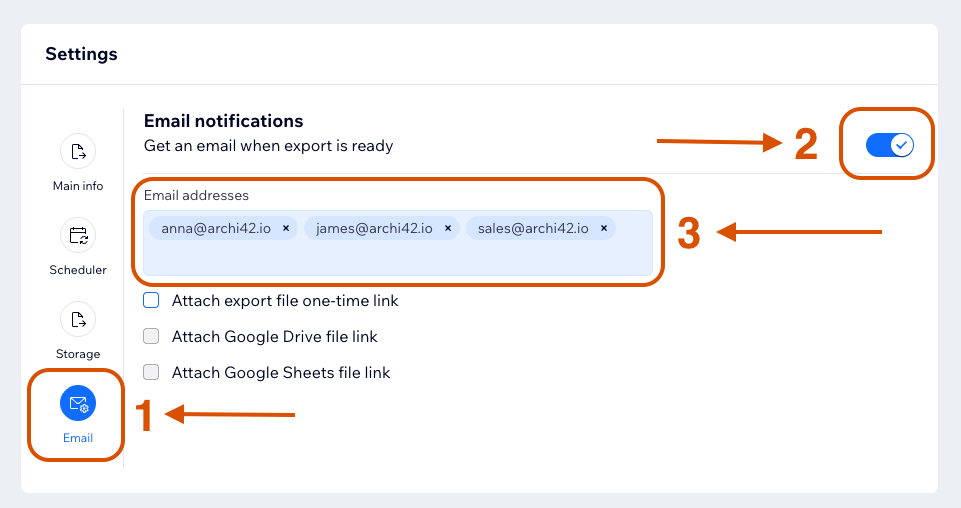
- Open Email.
- Turn on Get an email when export is ready.
- Add recipient email addresses.
- Choose which links should be attached.
- Save the template.
Recipient Limit
The number of notification emails is controlled by the current plan. See Upgrade Plan.
Recipient Editing
The site owner can edit email recipients.
Contributors can edit recipients only if the site owner enables that permission.
Attachment Links
Available attachment options:
- Attach export file one-time link
- Attach Google Drive file link: requires Google Drive storage enabled for the template.
- Attach Google Sheets file link: requires Google Sheets storage enabled for the template.
Attachment options are disabled until email notifications are enabled.
warning
The export file one-time link is a bearer link. Anyone who has access to the email or copied link can download the file while the link is valid.
tip
To include Google Drive or Google Sheets links in notification emails, enable the corresponding storage destination in the template first.