Scheduler
The scheduler automatically prepares export files for a template.
info
Scheduler availability and interval options depend on the current plan. See Upgrade Plan.
Enable Scheduler
- Open a template.
- Go to Settings.
- Open Scheduler.
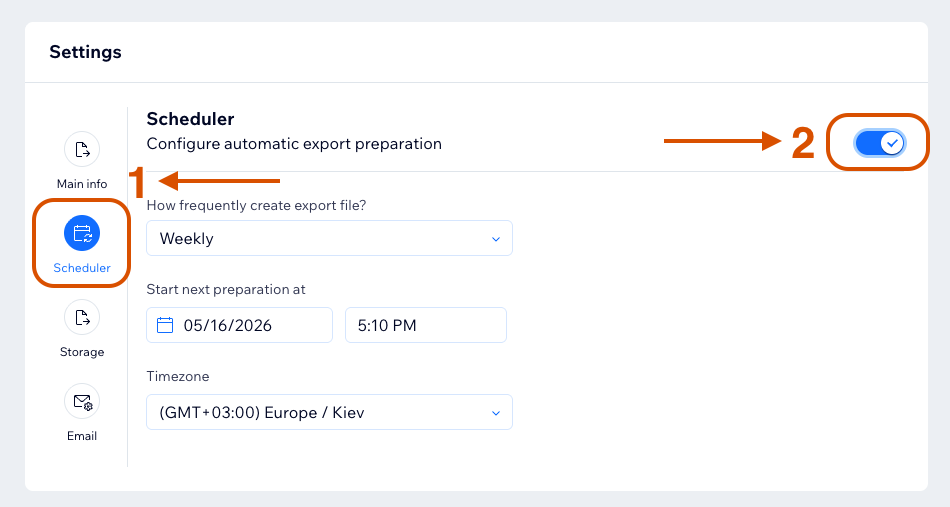
- Turn on Configure automatic export preparation.
- Choose the interval, start date, time, and timezone.
- Save the template.
Scheduler Intervals
The available interval options depend on the current plan.
| Plan | Available scheduler intervals |
|---|---|
| Free | Monthly |
| Starter | Weekly, Monthly |
| Pro | Every 12 hours, Every 6 hours, Daily, Weekly, Monthly |
| Advanced | Every 15 minutes, Every 30 minutes, Every hour, Every 3 hours, Every 6 hours, Every 12 hours, Daily, Weekly, Monthly |
info
If an interval is not available on the current plan, it can appear disabled or unavailable in the scheduler settings.
Disable Scheduler
Turn off Configure automatic export preparation and save the template.
You can also enable or disable scheduler from the Templates tab using the scheduler toggle.
Contributor Access
Contributors can use scheduler only if the site owner allows scheduler access.
Learn more in Contributor Access Settings.