Upgrade Plan
Use upgrade actions in FlexiExport to open the Wix upgrade flow.

tip
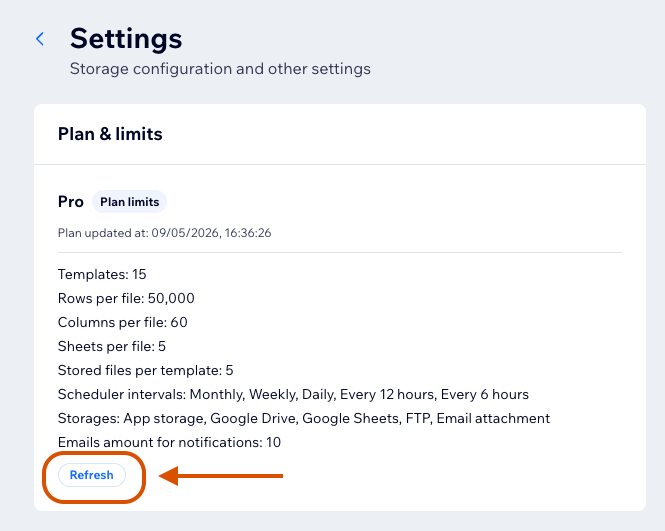
After upgrading, return to FlexiExport and refresh limits from Settings if the new plan is not reflected immediately.
Who Can Upgrade
The site owner can upgrade the app plan.
Contributors may see upgrade messaging, but plan changes must be handled by the owner.
Features Controlled by Plan
The current plan can affect:
- Number of templates.
- Rows per file.
- Columns per sheet.
- Sheets per file.
- Stored files per template.
- Scheduler intervals.
- Available storage destinations.
- Number of notification email addresses.
warning
Plan limits are enforced when configuring templates and when generating files. A template that was valid before a plan change can become blocked later.
Refresh Limits After Upgrade
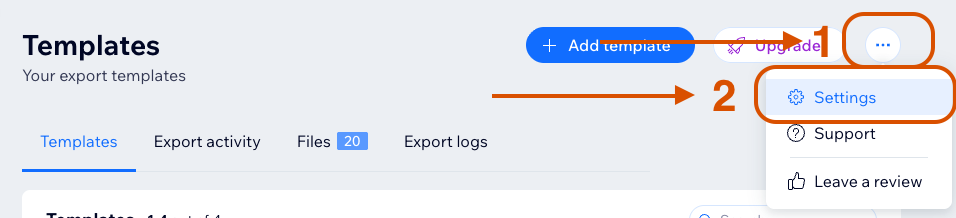
If upgraded limits are not visible immediately, refresh limits from the Settings page.
- Open Settings.
- Find Plan and limits.
- Click Refresh.
- Wait until the latest limits are loaded.
- Return to the template or dashboard action that was blocked.
If limits still look outdated after refresh, reload the browser page before contacting support.